 TruchiChat
Guide
How to Check You’re Talking to Who You Think
Encryption protects the message. To be sure who’s on the other end, you need to check their key once
Why You Need It
Each phone has its own key. Your app locks messages with your contact’s key, so what matters is that the key really is theirs. If someone managed to slip you a different one, they could read what you write. Comparing the safety number rules that out: if both phones see the same number, there’s no one in the middle.
What TruchiChat Does on Its Own
- When you scan an invitation, the app checks that your contact’s key is the one in the QR code. If it doesn’t match, it warns you and doesn’t send anything to that chat.
- If a contact’s key changes later on, it warns you and the chat waits until you accept it.
Step by Step
- Meet in person, or use another channel you both already trust, like a video call where you can see each other.
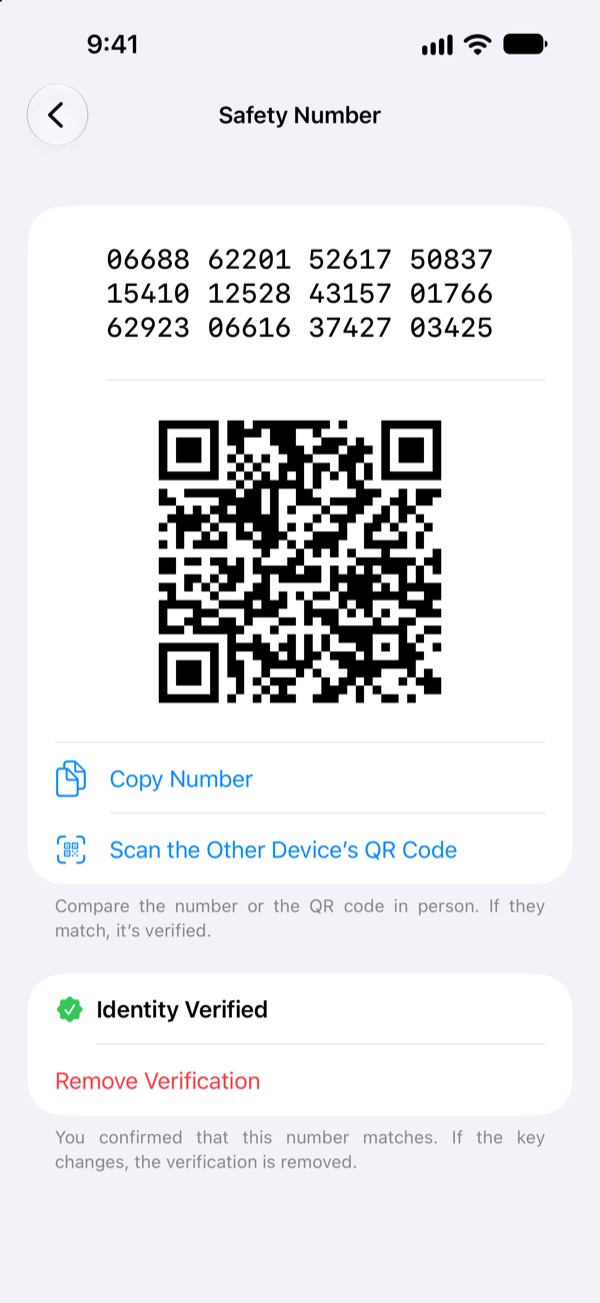
- In the chat, tap your contact’s name and go to Safety Number. It’s 60 digits, with its QR code.
- One of you taps Scan the Other Device’s QR Code and scans the QR code on the other phone. You can also read the numbers out loud.
- If it matches, the contact is marked Identity Verified.
If the Key Changes
A key changes mainly when your contact has switched phones or reinstalled the app. Before accepting it, ask them through another channel whether that’s what happened. If not, don’t accept it: the chat won’t send anything until you do.
Do this with the people you talk to about important things. Once is enough, as long as the key doesn’t change.
Want to try it? Free and ad-free, on iPhone and Android.
Download TruchiChat