 TruchiChat
Guide
Voice Notes With a Disguised Voice
A voice note carries your words and also your voice. In TruchiChat you can send the words in a different voice
Why Disguise Your Voice
Your voice says a lot about you: anyone who knows it recognizes you, and a recording can be forwarded or saved. If you’ve ever held back from sending a voice message because of that, voice disguise is for you.
How It Works
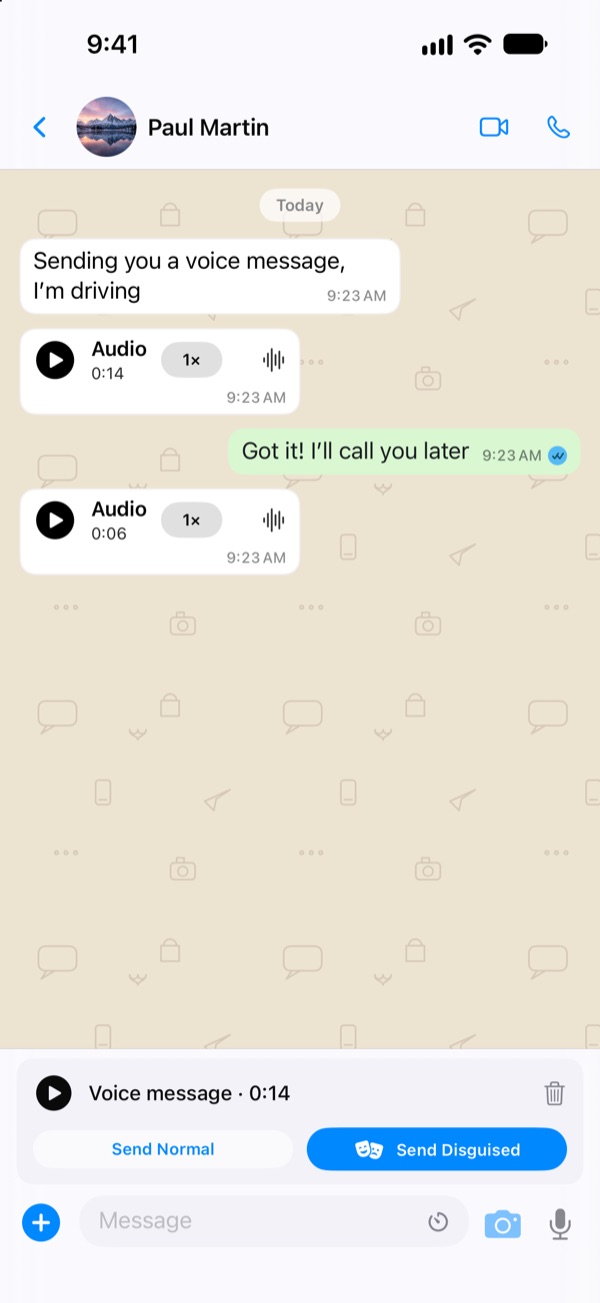
- In a chat, tap the microphone, talk and tap it again to stop.
- Before sending it, you can listen to it or throw it away.
- Choose Send Normal or Send Disguised. You decide for each note.
It works the same on iPhone and Android, and an iPhone and an Android phone can send each other disguised notes.
Hear the Difference
It’s a synthetic computer voice, not a person, run through the same disguise the app uses.
What Voice Disguise Does
- It remakes the note in a different voice: deeper, always at the same pitch and with a different timbre. The words are still understandable.
- Since the pitch is fixed, two different people end up sounding alike.
- It happens on your phone, before the note is encrypted. What leaves your phone is already the disguised voice: your real voice isn’t sent.
- If the disguise fails, the note isn’t sent. Your real voice is never sent by mistake.
And What It Doesn’t Do
- It doesn’t change what you say, the way you speak or the background noise. If you say your name or something recognizable can be heard, it will still be heard.
- It isn’t foolproof: it makes it harder for people to recognize you by your voice, but it can’t guarantee that no one ever will.
- It has a length limit: a very long note can’t be disguised, and the app tells you so.
Voice disguise uses WORLD, a public voice analysis and synthesis technique (3-clause BSD license; see Licenses).
Want to try it? Free and ad-free, on iPhone and Android.
Download TruchiChat